AI Checker
Plagiarism Checker
Grammar Checker
Content Quality
Guideline Checker
Readability Checker
Fact & AI Hallucination Checker

Extensions
MCP
Whether you’re a student, researcher, or journalist, you’ll likely need to format citations to support your findings. However, citation formatting can be convoluted considering the wide range of citation styles.
Our Citation Generator tool makes generating citations a breeze, so you can get back to focusing on your research, essay, or paper, while still properly crediting sources.
Checking facts while editing your essay, article, or paper? Learn about our Fact Checker’s citation feature.
Use this free interactive demonstration to see how Google DeepMind’s published SynthID-Text method samples candidate tokens, applies context-specific key values, and builds a detectable statistical pattern across a passage. The tool is an educational simplification with illustrative values and thresholds. It does not generate text with Gemini or Claude and does not run Google’s or Anthropic’s detector.
Whether you’re a student, researcher, or journalist, you’ll likely need to format citations to support your findings. However, citation formatting can be convoluted considering the wide range of citation styles.
Our Citation Generator tool makes generating citations a breeze, so you can get back to focusing on your research, essay, or paper, while still properly crediting sources.
Checking facts while editing your essay, article, or paper? Learn about our Fact Checker’s citation feature.
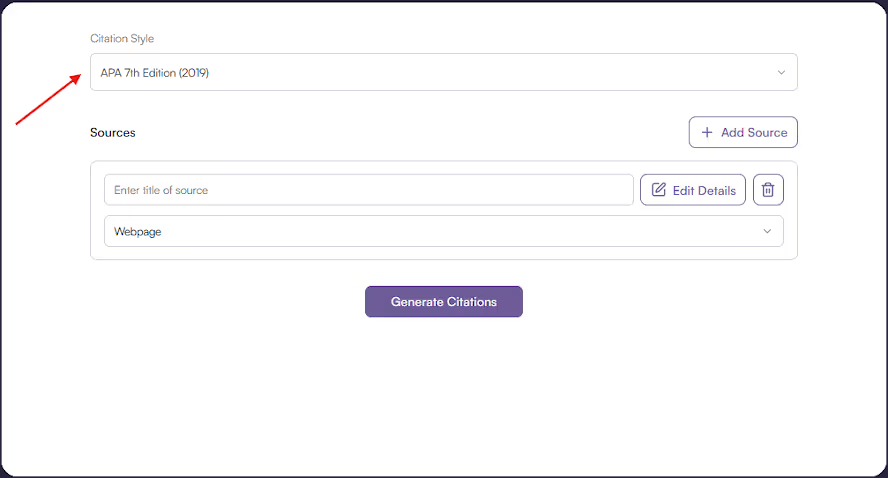
Select Citation Style
Select Citation Style - Choose from a variety of citation styles, including APA, MLA, IEEE.
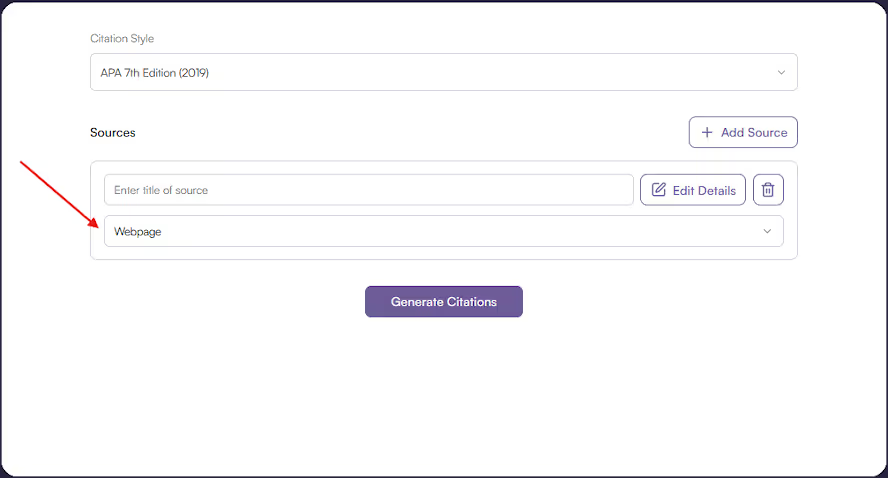
Select Source Type
Select Source Type - Choose from a variety of sources, including webpages, books, and reports.
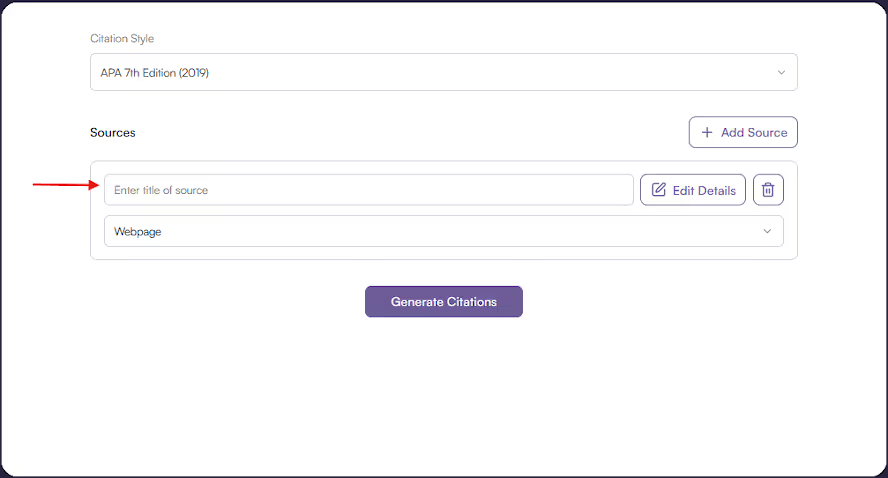
Enter Source Title
Enter Source Title - Put in the title of the source.
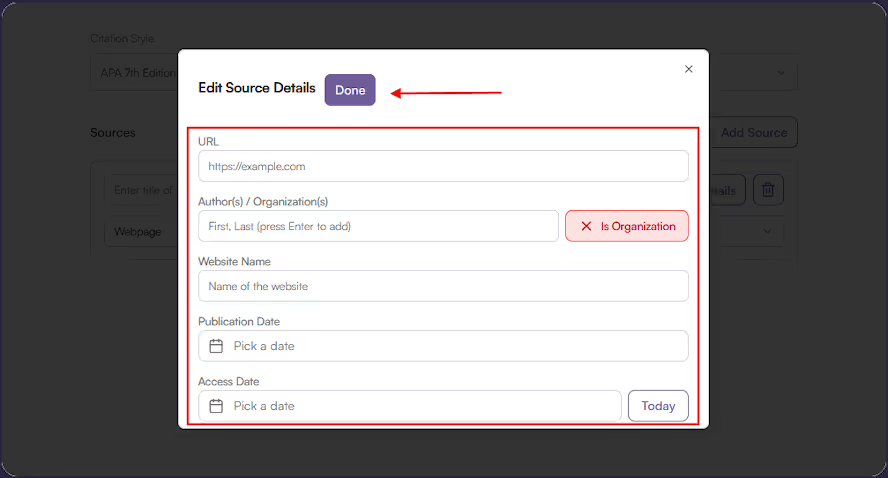
Enter Source Details
Enter Source Details - Add in the extra details needed for a citation.
Click Generate and Copy Results
Click Generate and Copy Results - Click ‘Generate Citations’ and wait for your result(s). Then, copy individually or ‘Copy All’ to grab a full list and paste wherever you’d like.
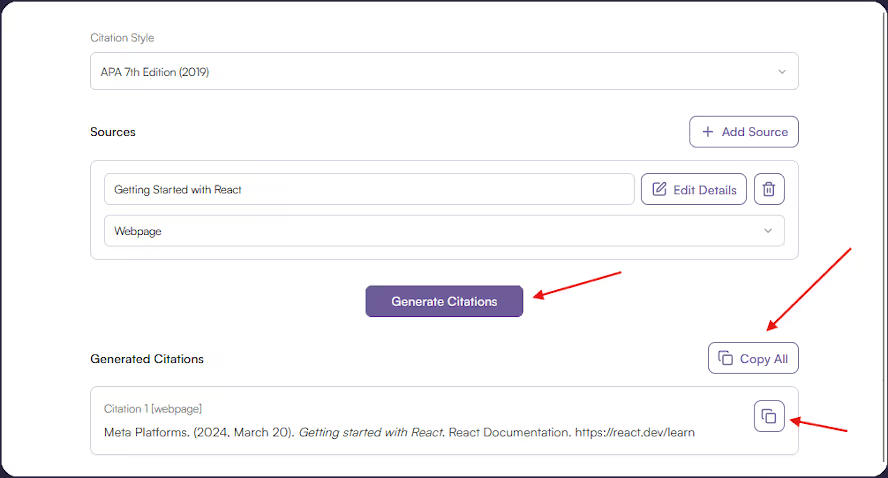
Our citation generator is capable of quickly and accurately producing formatted citations. It’s:
Citations are an important part of any student or professional’s work process for crediting the original authors of research.
The research process can be time-intensive. With the Originality.ai citation generator, you can make that process easier by quickly and properly formatting your citations with the tool.
Many citation tools have a complicated UI or require you to create an account; our tool is free (you are not required to log in) and easy to use.
In this article, we’ll walk you through how it works and what to keep in mind for its key features.
The citation generator can handle up to 15 sources at a time. Once processed, it will display the bibliographic results, which can then be copied individually or as a whole list.
The tool uses citeproc-py to do an initial creation of the citation list. Once the list is created in the desired style, it is processed through GPT-4o-mini to refine styling and edit formatting.
Say hello to easy citation formatting with the Originality.ai Citation Generator! Conveniently format citations in the proper style so you can credit sources and streamline your workflow.
If you like this tool, check out Originality.ai’s Plagiarism Checker and Fact Checker.
Is this tool free?

Yes! No account registration is required.
Are there limitations on the tool?
To keep this tool free to use, we have a limit of 15 sources per generation and 5 generations per day.
What library does it use?
The tool uses citeproc-py.
What AI model does it use?
GPT-4o-mini.

AI & Plagiarism Detector for Serious Content Publishers
Originality.ai
64 Hurontario St
Collingwood, Ontario
L9Y 2L6





