Vérificateur d’IA
Vérificateur de plagiat
Correcteur de grammaire
Qualité du contenu
Vérificateur de lignes directrices
Vérificateur de lisibilité
Vérificateur de faits

Extension Chrome
MCP
Le vérificateur de faits breveté, en temps réel et précis d’Originality.ai identifie les faits erronés et vous aide à éviter les hallucinations de l’IA. Publiez du contenu avec intégrité.


























Une suite complète de produits d’AQ/CQ

En plus de notre fonctionnalité de vérification des faits répertoriée sur cette page, nous proposons une suite complète d’outils d’IA pour aider les éditeurs, notamment Vérification de l’IA, Vérification du plagiat, Vérification de la lisibilité & Grammaire & Vérification de l’orthographe.

Vérificateur de faits ›
Utilisez notre outil d’aide à la vérification des faits pour vous assurer que votre contenu est factuellement correct.

Vérificateur d’IA ›
AI Detector le plus précis pour tous les outils d’écriture IA. Essayez-le maintenant gratuitement.

Vérificateur de plagiat ›
Vérifiez si un texte a été plagié à partir de n’importe où sur Internet.

What is Originality.ai MCP (Model Context Protocol)?
What are MCP and AI Connectors?
MCP (Model Context Protocol) also called AI connectors are the next innovation in AI-assisted workflows. MCP is an open standard that connects tools, like Originality.ai, to AI assistants, think ChatGPT and Claude.
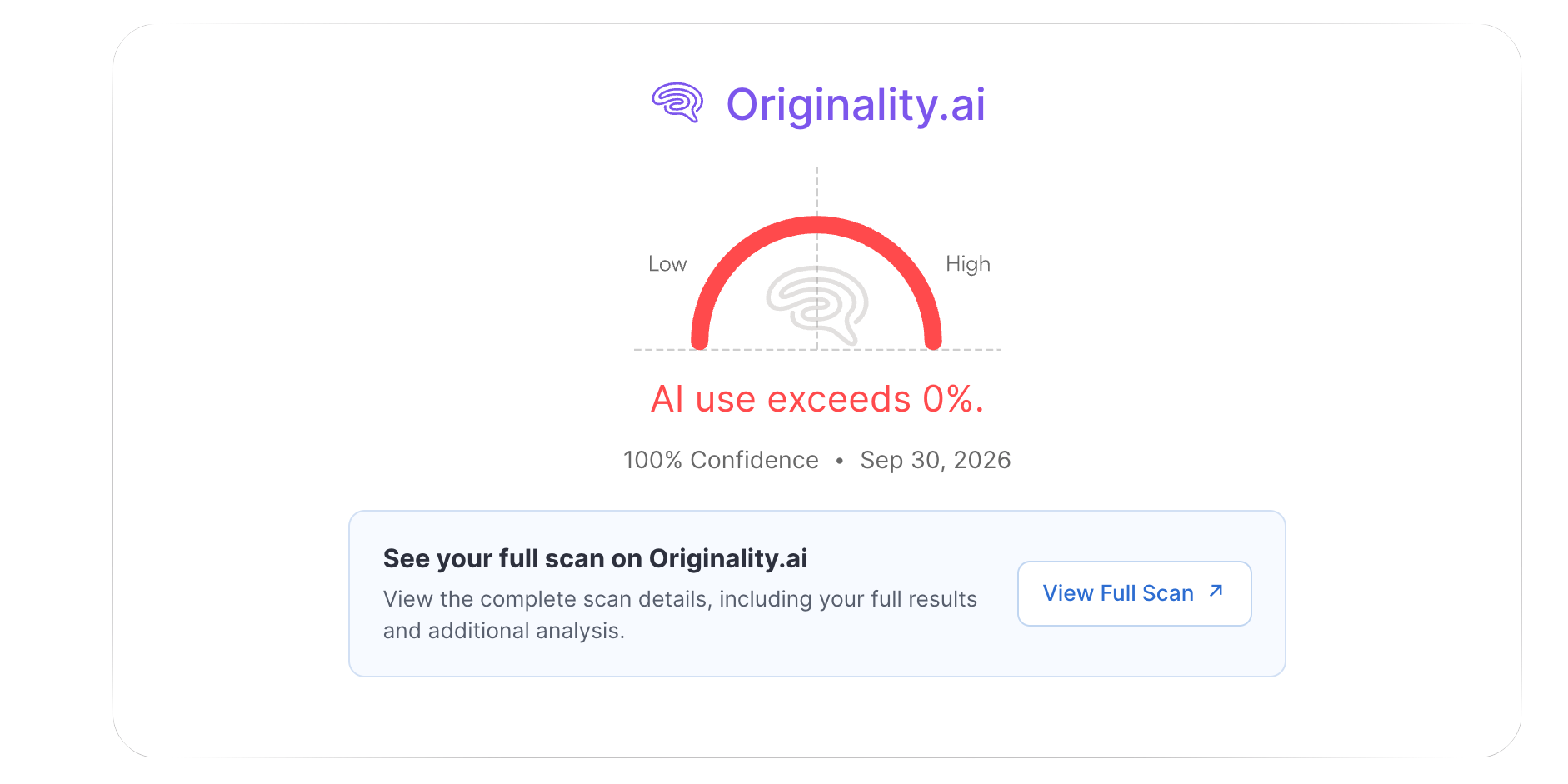
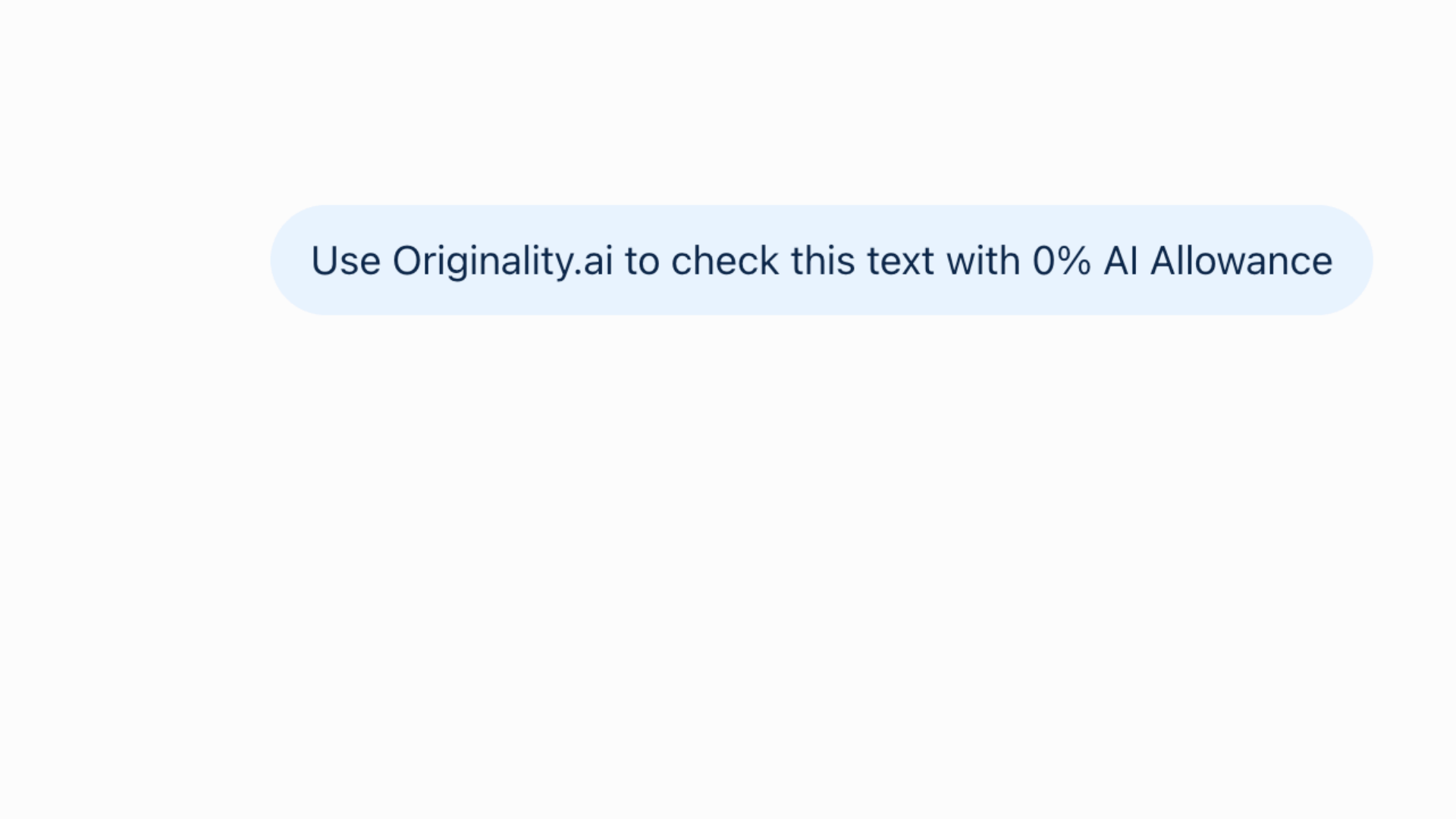
With Originality.ai MCP you can detect AI content without leaving your AI chat. Once installed, just ask AI to scan with AI Allowance:
Example: Use Originality.ai to check this text with 15% AI Allowance
Reviewing blogs or assignments for potential AI usage just got that much easier.

Key Features: Originality.ai MCP Integration

Already working in the ChatGPT, Codex, or Claude ecosystem? Now you can check for Likely AI content without leaving your AI conversation.
ChatGPT MCP
AI checker in Codex or ChatGPT. Maintain content transparency in OpenAI’s agentic workflows.
Claude AI Connector
AI detection in Claude. Scan for AI text with Originality.ai using Anthropic’s latest AI agents.

Humans and AI are Multilingual: Originality.ai MCP is too
Accurately Check for AI Writing in 30+ Languages
Prompt ChatGPT or Claude to run a multi-language scan. Then, see if text is Likely AI or Likely Original in over 30 languages with 97.8% accuracy.
Step 2
Prompt an Originality.ai Scan
Easily ask ChatGPT or Claude to use @originality.ai to run an AI detection scan on text.
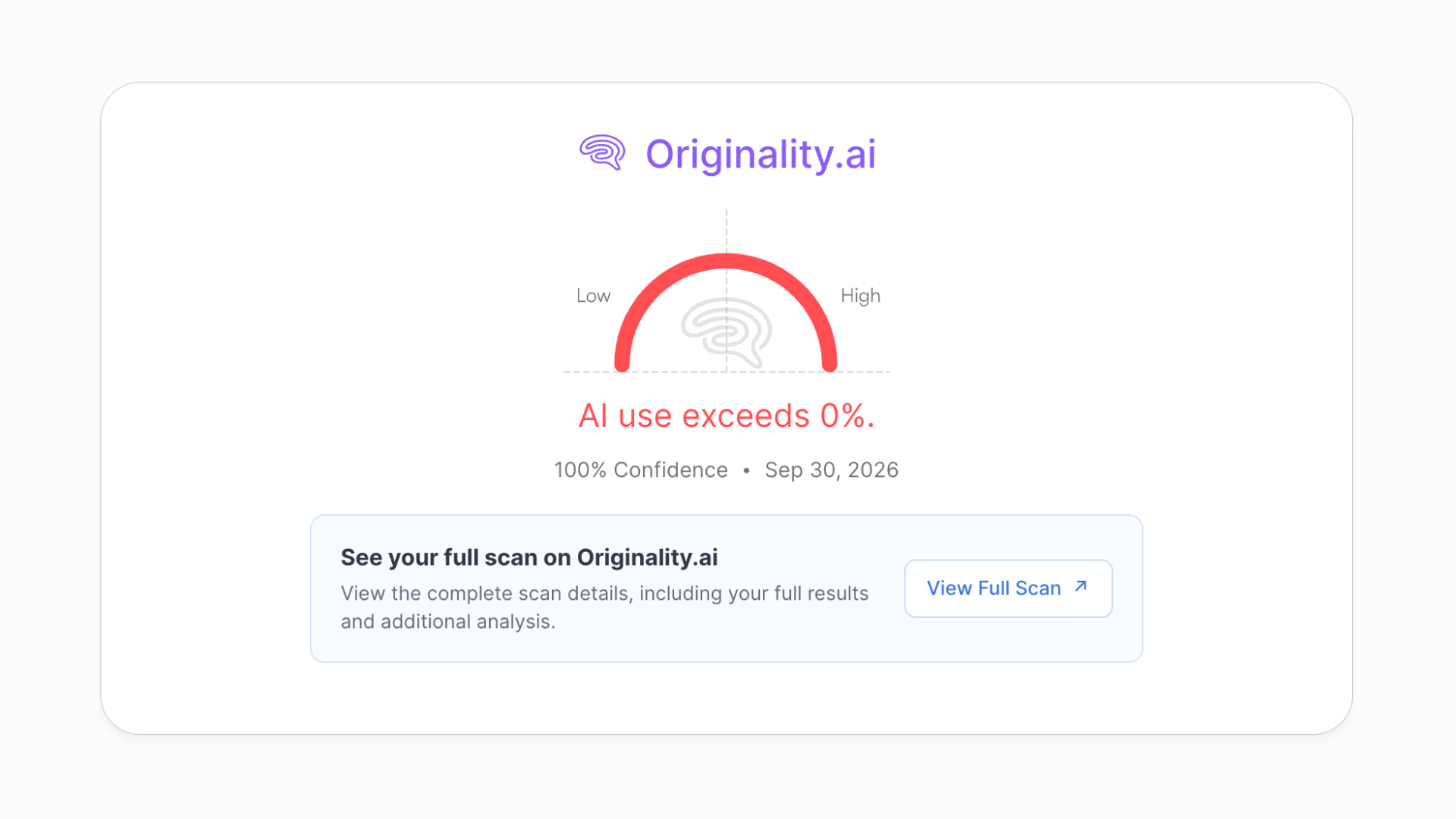
Step 3
Review Results
See your scan results right in the AI chat, or ‘View Full Scan’ to navigate to the app for more details.


Writers, Editors & Marketers
Use Originality.ai MCP to check drafts for AI-generated text and plagiarism without leaving your AI assistant.

Students & Teachers
Run Originality.ai checks through your AI assistant to support assignment reviews and discussions about originality.

Schools & Enterprise
Connect Originality.ai to your AI agents through MCP and incorporate content checks into your review workflows.

Intégrations : extensions et plugins
Intégrez facilement notre vérificateur d’IA à vos plateformes préférées comme Chrome, Moodle et bien plus encore. Vérifiez l’utilisation de l’IA sans perdre le rythme.


Sam Saltis

Originality est un excellent outil pour détecter le contenu généré par l’IA. Le produit a été inestimable pour notre équipe de marketing de contenu. Fernanda et l’équipe sont toujours très réactives et serviables. Je recommande vivement ce produit.
Miguel Maloney Thompson
J’ai l’occasion de m’assurer que mes écrits sont exempts de plagiat, et avec la grande quantité de contenu généré par l’IA, je peux veiller à ce que mes écrits ne soient pas signalés comme un contenu de plus parmi tant d’autres.
Je fais de la rédaction technique, où il n’existe qu’un nombre limité de façons de décrire des concepts et des idées. Cependant, Originality.ai me donne l’occasion de personnaliser encore davantage mes écrits, ce qui constitue un avantage. Avec un peu de temps, je peux donner à mon contenu un sentiment d’unicité.
John Kohn
Fiable et digne de confiance. Originality répond toujours très rapidement à mes questions et m’apporte son aide. C’est un très bon outil pour détecter l’utilisation de ChatGPT dans les travaux universitaires, surtout grâce à la fonctionnalité "view writing" qui montre le texte saisi par l’étudiant au fur et à mesure qu’il le tapait.
Stevie Lambert
L’IA est précise par rapport aux options gratuites, et le personnel d’assistance, comme Ellie, est très utile. L’interface est facile à utiliser et indique le % de probabilité que le travail soit généré par l’IA. Il est également appréciable qu’elle indique quelles parties peuvent être générées par l’IA ou non.
Aptidus
Le service fourni est exceptionnel, offrant le détecteur d’IA le plus précis et le plus fiable disponible sur le marché. L’équipe du service client est extrêmement réactive.
Vivek Pandey
Il existe de nombreux outils similaires de détection de l’IA en ligne, mais rien n’arrive même près de ce qu’ils proposent. Je ne peux faire confiance à aucun autre outil que les leurs. J’ai essayé peut-être 20 à 30 autres sites Web et j’ai finalement choisi les leurs.
Yanmin Wang
J’ai eu une excellente expérience avec l’équipe d’assistance d’Originality.ai. Elle a été incroyablement réactive et a fourni des réponses claires et détaillées à toutes mes questions. Les explications étaient approfondies, et je comprends désormais beaucoup mieux le fonctionnement de la plateforme ainsi que la manière dont mon contenu est traité.
L’équipe a fait preuve de patience et de professionnalisme, et est allée au-delà de mes attentes pour s’assurer que toutes mes préoccupations étaient prises en compte. J’apprécie sincèrement son aide et le service client de premier ordre qu’elle fournit. Je recommande vivement !
Canadian Law Student
Originality.ai est le meilleur outil du marché. J’ai utilisé des services comparables et celui-ci est exceptionnel. Il fournit un rapport précis avec un score de correspondance qui aide vraiment les rédacteurs/chercheurs à ajuster et à améliorer leur travail.
Il existe également des fonctionnalités avancées telles que la détection de paraphrase qui ne sont disponibles avec aucun autre service comparable. Les fonctionnalités fournies par Originality.ai sont exceptionnelles pour les utilisateurs qui souhaitent éviter le plagiat et également améliorer leur processus de recherche. J’espère continuer à utiliser Originality.ai pendant de nombreuses années.
John Willsdon
C’est un outil vraiment utile. Certainement le meilleur des détecteurs d’IA que j’ai essayés. Ce qui le rend excellent, c’est que vous disposez également de nombreux autres outils vraiment utiles. Le vérificateur de faits est fantastique, il vous donne un retour sur le caractère factuel ou non des points de votre dissertation en lisant les sources indiquées dans vos citations.
Todd
J’utilise cet outil depuis le début ! Et il m’a sauvé la mise à de nombreuses reprises. Souvent, lors de la vérification des sites de clients, le problème venait de contenu généré par AI ou de plagiat.
Chris Swanson
Lorsque je fais appel à des rédacteurs, je veux un contenu 100 % rédigé par des humains. Je compte sur Originality.ai pour le vérifier pour moi.
Dirk Berger
Originality.ai m’a évité de faire une grosse erreur. J’ai écrit un livre avec l’aide de ChatGPT, 40 % de mon travail est de l’IA ; 60 % est humain. Il a identifié l’IA, et maintenant je l’écris entièrement moi-même. 88-100 % humain. Merci Originality.ai.
Rob McTavish
J’ai commencé à chercher un outil simple pour confirmer mes soupçons concernant certains des travaux soumis par mes étudiants dans des cours de communication de première année. J’ai trouvé Originality.ai et je l’ai essayé. Il a si bien fonctionné que je l’ai même testé avec du contenu que j’avais créé à l’aide de l’IA à titre d’exemple et, effectivement, il a parfaitement déterminé ce qui relevait de mon travail, ce qui avait été entièrement rédigé par l’IA et ce qui était du contenu d’IA modifié.
Andrew Stevenson
Originality.ai a été remarquable dans sa capacité à détecter le contenu généré par l’IA. Le service client est également incroyable par son niveau de rigueur et de réactivité. Je recommande vivement ce programme.
Pieter Steenkamp
J’ai trouvé qu’Originality.ai était le meilleur détecteur d’IA. Je l’utilise pour les devoirs de mon étudiant et le recommande à mes collègues.
JC Playz
Originality répond vraiment aux attentes, il est très fiable et dispose du meilleur détecteur d’IA. Maintenant, je comprends pourquoi tant de personnes l’utilisent, notamment des professionnels.
Trish McLean
Expérience incroyable. Excellent produit. Très facile à utiliser, complet et instructif. Brady a été incroyablement utile sur le chat. Il a soigneusement vérifié mon document pour comprendre pourquoi il avait un score élevé pour l’IA, puis me l’a expliqué. Il m’a fourni des conseils personnalisés sur la marche à suivre. Excellent ! Merci Brady.
Joseph Bereber
Le service client est excellent. Non seulement ils sont très accommodants, mais ils sont aussi extrêmement serviables. Les outils sur Originality.ai sont également incroyablement précis et très utiles. Je n’ai eu que des expériences positives en utilisant ce service.
Peter Stuart
Originality.ai est de loin le meilleur outil de détection d’IA. Nous avons utilisé d’autres outils pour détecter l’IA dans le contenu, mais nous avons constaté qu’Originality.ai est de loin le plus précis. Cela, combiné à des plans de paiement flexibles adaptés aux besoins individuels et à un service client réactif. Originality.ai est une évidence si vous recherchez une solution de détection d’IA.
Mis en avant par des publications de premier plan

Jennifer Korn
Comment les entreprises adoptent l’IA générative pour leurs employés… ou non
De nombreuses entreprises de premier plan ont entièrement bloqué l’utilisation interne de ChatGPT, notamment JPMorgan Chase, Northrup Grumman, Apple, Verizon, Spotify et Accenture, selon le détecteur de contenu IA Originality.AI, plusieurs d’entre elles invoquant des préoccupations liées à la confidentialité et à la sécurité.

Ben Schreckinger
IA vs opinion publique
Originality.ai, un site qui propose des services de détection de contenu généré par l’IA et de plagiat, a publié un outil de suivi pratique qui répertorie les 10 poursuites en cours contre OpenAI et ChatGPT.

Betsy Reed
Les cueilleurs de champignons sont invités à éviter les livres sur la cueillette vendus sur Amazon qui semblent avoir été écrits par l’IA
Quatre extraits des livres ont été examinés pour le Guardian par Originality.ai, une entreprise américaine qui détecte les contenus générés par l’IA.

Steven Lee Myers & Tiffany Hsu
Un autre aspect de l’essor de l’I.A. : détecter ce que l’I.A. produit
Plus d’une douzaine d’entreprises ont vu le jour pour proposer des services visant à déterminer si des photos, des textes et des vidéos sont créés par des humains ou par des machines.

IA générative : c’est l’engouement, et non l’hyperintelligence, qui fait grimper les valorisations
L’intelligence artificielle générative pourrait produire de la magie dans le ciel, affirme Sam Altman, fondateur de la start-up pionnière OpenAI. Les entrepreneurs qui réussissent sont en droit de faire des déclarations visionnaires.

Sara Fischer
Les grands sites web empêchent les robots d’exploration d’IA d’accéder à leur contenu
Près de 20 % des 1000 sites Web les plus populaires au monde bloquent les robots d’exploration qui collectent des données Web pour les services d’IA, selon de nouvelles données de Originality.AI, un détecteur de contenu IA.

Andrea Taloni, Vincenzo Scorcia, and Giuseppe Giannaccare
Menaces modernes dans le milieu universitaire : évaluation des scores de détection du plagiat et de l’intelligence artificielle de ChatGPT
Le plagiat et l’intégrité de la recherche sont des questions sensibles dans le milieu universitaire, surtout après l’essor récent de l’intelligence artificielle (IA) et des grands modèles de langage (LLMs) tels que GPT-4.0 [1].

Sara Guaglione
Pourquoi les éditeurs remettent en question l’efficacité du blocage des robots d’exploration Web d’IA
Plusieurs éditeurs — dont Bloomberg et The New York Times — ont rapidement empêché le robot d’exploration web d’OpenAI d’accéder à leurs sites, afin de protéger leur contenu contre l’extraction et l’utilisation pour alimenter les grands modèles de langage (LLMs) de l’entreprise technologique spécialisée dans l’intelligence artificielle.

How much does Originality.ai MCP cost?

Originality.ai offers flexible pricing. When you sign up for Pro or Enterprise plans you can run Originality.ai AI scans in ChatGPT and Claude.
How do I connect an AI assistant to Originality.ai MCP?
You can connect to both ChatGPT and Claude easily.
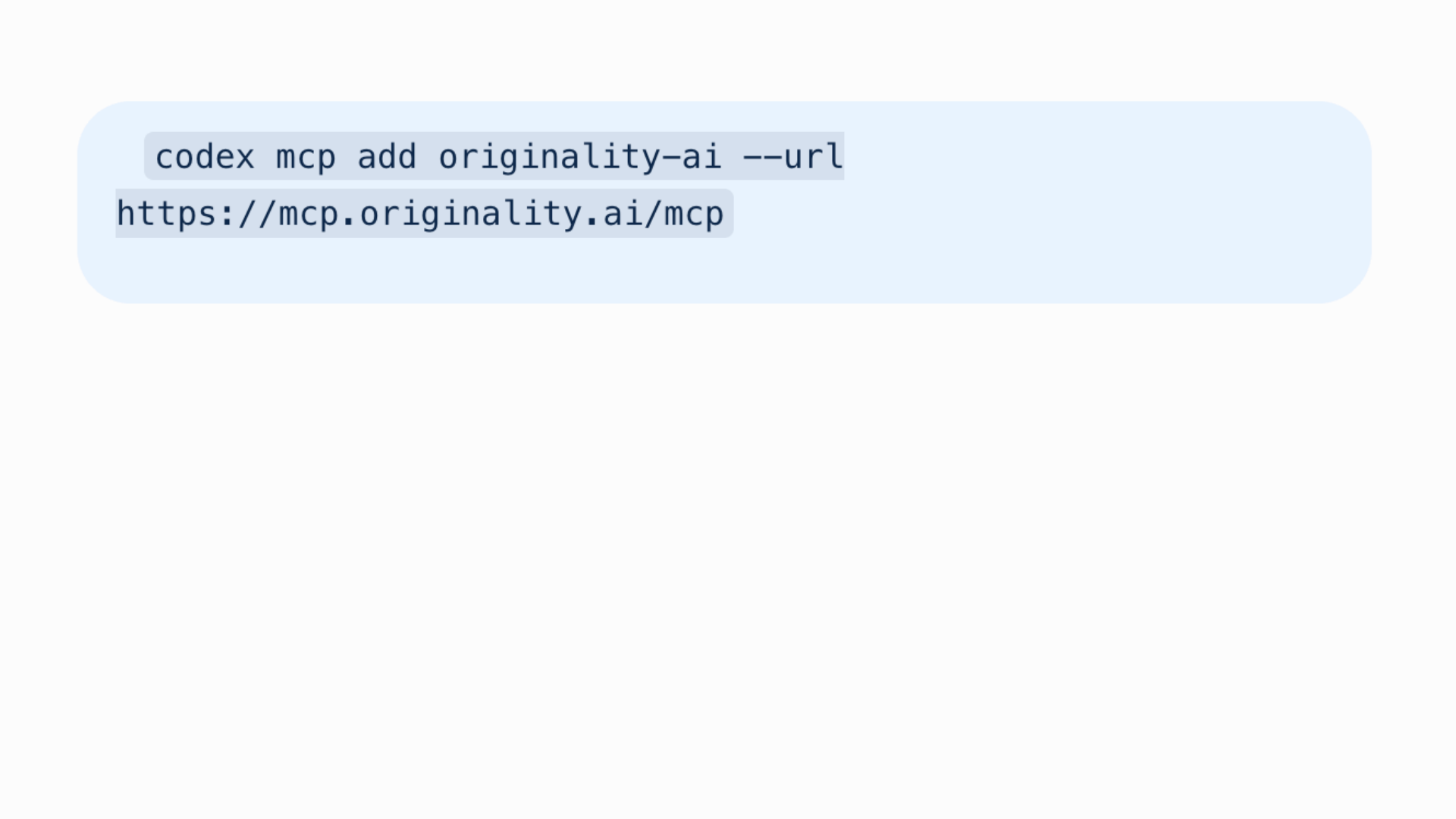
For a detailed guide on how to connect to the Originality.ai MCP server visit our technical user documentation.
What scans can I run with Originality.ai MCP?
The Originality.ai MCP currently supports AI Allowance and Multi language AI detection scans, so that you can scan for AI content without leaving your AI chat.
Where can I get more details about my Originality.ai scans through ChatGPT or Claude?
Originality.ai MCP enables you to view your AI scores right within ChatGPT or Claude. Then, if you want to view full results or run more analysis with Originality.ai’s full suite of tools including plagiarism, grammar, readability, and content quality scans you can conveniently navigate to the Originality.ai app by clicking ‘View Full Scan.’
If I run a scan with Originality.ai in an AI assistant, can I see it in the app?
Yes, simply login to the Originality.ai app to see all of your scan history (including MCP scans).
Can I connect to other AI assistants with the Originality.ai MCP Server?
You may be able to connect the Originality.ai MCP server to other compatible AI tools. For step-by-step instructions see our technical user documentation.
Is the Originality.ai MCP the same as an API?
MCP (model context protocol) is a new and innovative way to connect tools with AI assistants. APIs are a software integration. While both can improve productivity they are used differently. Check out our technical documents to learn more: MCP user documentation and API documentation.
Is the content I scan with Originality.ai MCP secure?
Yes, when you scan content with Originality.ai MCP, Originality.ai follows the same industry standard practices for data security. Read more in our privacy policy.

Détecteur d’IA et de plagiat pour les éditeurs de contenu sérieux
Originality.ai
64 Hurontario St
Collingwood, Ontario
L9Y 2L6